> For the complete documentation index, see [llms.txt](https://docs.fuku.ai/llms.txt). Markdown versions of documentation pages are available by appending `.md` to page URLs; this page is available as [Markdown](https://docs.fuku.ai/user-manual-guide/quickstart.md).

# How To Conduct A Candidate Search?

1. **Select the location** where you want to conduct the search.
2. **Enter the job title(s)**.
   * You may input **multiple job titles** at the same time.
   * Job titles can be entered **even if they are not listed in the dropdown**.
3. **Select the industry**, if you have a preferred industry.
   * This field is optional and can be left blank.
   * &#x20;Multiple industries could be included at a time **even if they are not listed in the dropdown**.
4. **Apply additional requirements** under the **Filters** section.
   * Keep in mind that this is an **intention-based AI search**. Unlike conventional Boolean searches that rely on keywords, this intention-based search delivers better results when more detailed information is provided in the Filters.
5. Click **“Search.”** Sit back and let our candidate finder, Faye does the hard work for you! She will be going through countless resumes to find the perfect candidates for you! **Here’s a search example** to guide you if you ever feel a bit lost.

### Search Example

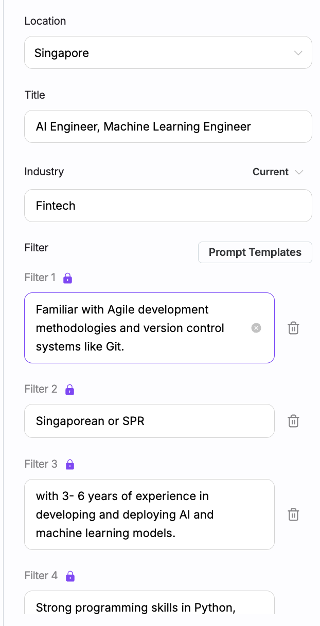
<table data-header-hidden><thead><tr><th valign="top"></th><th></th></tr></thead><tbody><tr><td valign="top">Job Opening</td><td>Fūkū Search</td></tr><tr><td valign="top"><p>Position: AI Engineer/Machine Learning Engineer (Fintech)</p><p>Location: Singapore</p><p>Job requirements:</p><ul><li>At least 3 years of experience in developing and deploying AI and machine learning models.</li><li>Singaporean or SPR</li><li>Strong programming skills in Python, R, or similar languages, with experience in frameworks like TensorFlow, PyTorch, or Scikit-learn.</li><li>Familiarity with Agile development methodologies and version control systems like Git.</li></ul><p> </p><p></p></td><td><img src="https://2841697798-files.gitbook.io/~/files/v0/b/gitbook-x-prod.appspot.com/o/spaces%2Fu0Ol6hN5lIMoH0mSf1wI%2Fuploads%2F21chy1TPScuBlNNvGI84%2Fimage.png?alt=media&amp;token=1be5219b-ea45-42cc-b2c4-ec04d0a8bbcf" alt="" data-size="original"></td></tr></tbody></table>


---

# Agent Instructions
This documentation is published with GitBook. GitBook is the documentation platform designed so that both humans and AI agents can read, navigate, and reason over technical content effectively. Learn more at gitbook.com.

## Querying This Documentation
If you need additional information that is not directly available in this page, you can query the documentation dynamically by asking a question.

Perform an HTTP GET request on the current page URL with the `ask` query parameter, and the optional `goal` query parameter:

```
GET https://docs.fuku.ai/user-manual-guide/quickstart.md?ask=<question>&goal=<endgoal>
```

`ask` is the immediate question: it should be specific, self-contained, and written in natural language.
`goal` is optional and describes the broader end goal you are ultimately trying to accomplish on behalf of the user. GitBook uses it to tailor the answer towards what is most useful for that goal.

The response will contain a direct answer to the question and relevant excerpts and sources from the documentation.

Use this mechanism when the answer is not explicitly present in the current page, you need clarification or additional context, or you want to retrieve related documentation sections.